Watch It First
Fair warning up front: the HeadRush MX5 a lot of you have been emailing me about has been discontinued and is no longer stocked.
So rather than send you chasing a unicorn, let’s talk about the compact modeller that’s actually eating the MX5’s lunch right now.
The Line 6 Pod Go has been on my board for ages now, and honestly, I keep finding new reasons to love it.
Build Quality – Compact but Doesn’t Feel Cheap
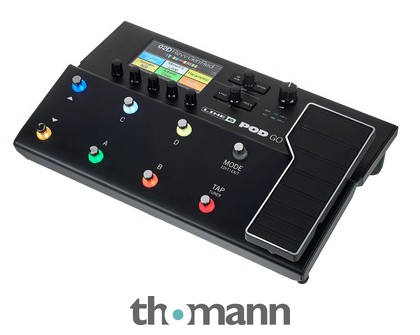
The Pod Go is a proper floorboard unit, not a tiny desktop box you have to prop up. Metal chassis, sturdy footswitches with LED rings, and a 4.3″ colour screen that’s actually readable on a dark stage.
It’s light enough to throw in a backpack too, which matters if you’re gigging around town without a roadie carrying your gear.
Sound and Tone – Where It Punches Above Its Price
This runs on Line 6’s Helix, M-series, and Legacy modelling engines, which is the same DNA as their flagship units, just trimmed down. You get over 300 amps, cabs, and effects to pull from.
You can stack up to six blocks at once — amp, cab, and four effects, or however you want to split that. It’s not unlimited like the full Helix, but for 90% of players that’s genuinely plenty.
The amp models are convincing enough that I’ve used this direct into FOH at gigs with zero complaints. That’s not nothing — modelling used to mean „good enough for practice,” and this is well past that bar now.
Third-party IR loading is supported too, so if you’ve got a favourite impulse response from your own cab, you’re not stuck with the stock options.
Playability and Everyday Use
The built-in expression pedal is a genuinely good addition — no need to buy a separate wah or volume pedal, it’s already there and assignable to whatever parameter you want.
There’s a proper looper built in too, plus an effects loop if you want to run the unit in four-cable-method with a real amp instead of going direct.
The free Pod Go Edit app on desktop makes building patches way less fiddly than tweaking everything from the small footswitches, which is how I’d recommend doing your initial setup.
The Ten-Block Limit
Worth flagging early: you’re capped at ten blocks total per patch. If you play something simple like metal or classic rock, that’s not a problem. If you’re the type who wants five modulation pedals running simultaneously, you’ll bump into the ceiling.
Who Actually Needs This
If you want one box that replaces an amp, a pedalboard, and a looper for gigging or home recording, this is exactly the tool. It’s also brilliant for silent practice through headphones late at night.
Home players who don’t want to build a whole pedalboard from scratch will get the most value here — one unit, one cable, done.
Who Should Skip It
Metal players chasing extreme signal chains with a dozen simultaneous blocks should look at the bigger Helix or HX Stomp instead. And if you genuinely just want a real tube amp in the room, something like the Blackstar HT-20R MKIII will always feel different under your fingers than any modeller, this one included.
The Honest Niggles
- Ten-block limit per patch can feel restrictive for effects-heavy players
- Screen and footswitch layout take a few sessions to memorise
- No XLR output built in, so you’ll want an adapter for going direct to a mixing desk
- Editing on the unit itself is slower than using the desktop app
None of it stopped me gigging with it every week for over a year, for what it’s worth.
Pod Go vs the Rest of the Compact Modeller Market
Against the NUX Amp Academy, the Pod Go costs more but the amp modelling and build quality are genuinely a tier up — the NUX is the budget option, this is the „buy it once” option.
Compared to a modelling combo amp like the Marshall Code 25, the Pod Go is more flexible since it’s not tied to one set of built-in speakers, but you’ll need your own amp or monitors to hear it properly.
If your main need is modulation rather than full amp modelling, pairing this with a dedicated pedal like the TC Electronic Afterglow Chorus in the effects loop can actually sound better than relying on the onboard chorus block alone.
And if you’re set on staying fully digital but want a desktop-style unit similar in spirit to what the MX5 offered, keep in mind most of that category has shifted toward floorboard designs like this one — the touchscreen desktop modeller niche has genuinely thinned out over the last couple of years.
Setting Up Your First Patches
Don’t just grab the factory presets and assume that’s the ceiling — most of them are built to show off features rather than sound genuinely great out of the box.
Spend twenty minutes with the Pod Go Edit app building two or three patches around amps you actually like, rather than the ones that sound flashy through headphones. A clean patch, a crunch patch, and a lead patch will cover most gigs.
Also worth doing early: set your global EQ block to taste for the room you play in most, rather than fighting it patch by patch. It saves a lot of fiddling later.
Specs at a Glance
- Over 300 effects and models from the Helix, M, and Legacy series
- Up to 6 amp/cab/effects blocks simultaneously
- Built-in expression pedal
- Onboard looper
- Third-party impulse response (IR) loading
- 4.3-inch colour LCD display
- Free Pod Go Edit desktop/mobile app
- Compact, lightweight floorboard design
Final Verdict
The Line 6 Pod Go is one of those rare pedals that actually deserves its sales ranking. It’s not trying to be everything to everyone — it’s trying to be the single box that replaces your amp, board, and looper without a steep learning curve.
If you were eyeing the HeadRush MX5 before finding out it’s gone, don’t panic. This does the job just as well, arguably better for gigging players, and it’s easy to recommend without any asterisks.